
GIS MappingProfessional Field Management at Scale
Core Capabilities
Global Field Drawing
Draw field boundaries anywhere in the world with GPS accuracy. Upload GeoJSON and shapefiles for instant boundary generation.
Smart Tagging System
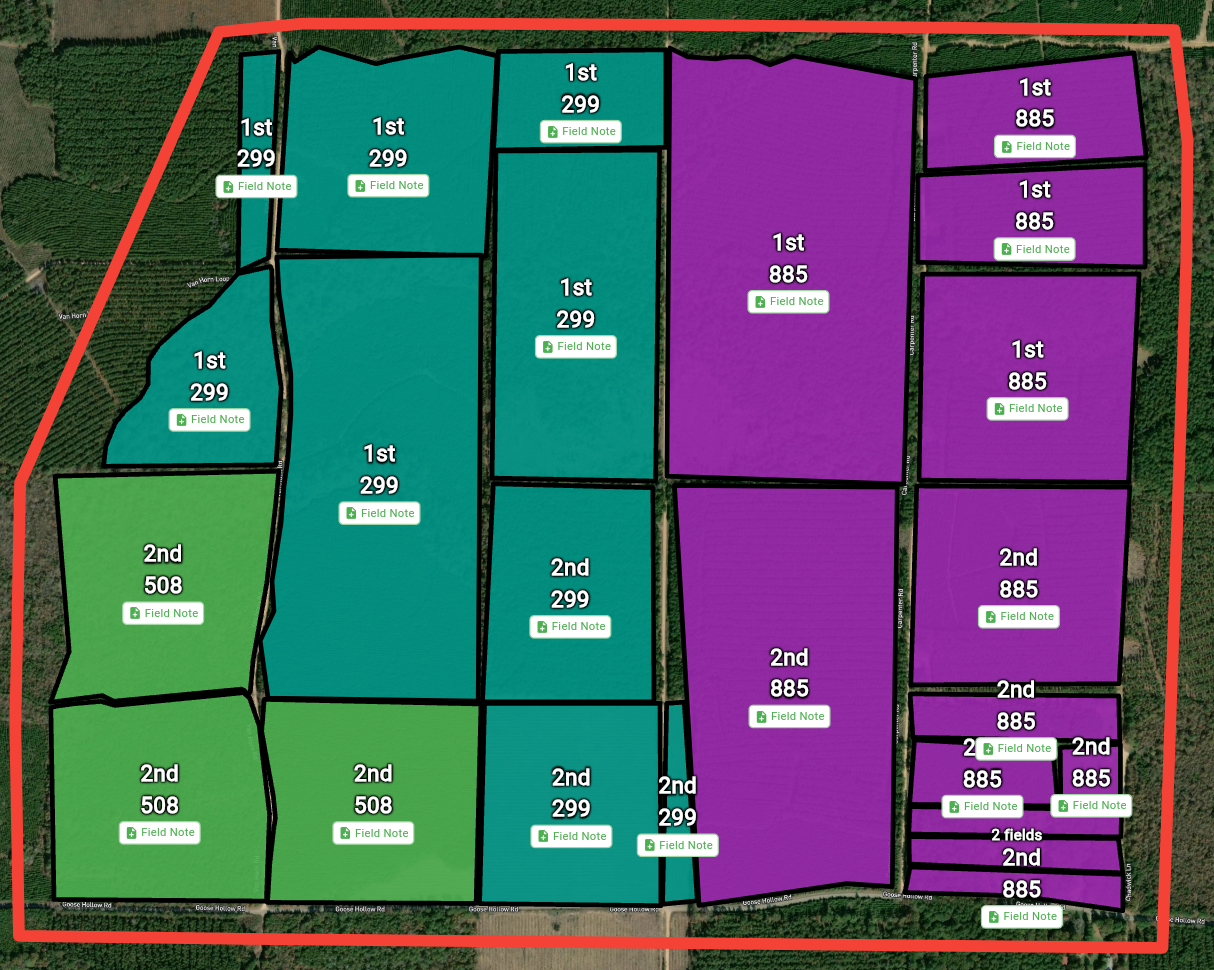
Tag fields with variety, irrigation type, soil type, grower, farm, or any custom attribute. Filter, color-code, and batch update with ease.
Team Collaboration
Share fields with your organization for seamless collaboration with scouts, growers, consultants, and team members.
Manage Thousands of Fields at Once
The power of batch operations means you can update thousands of fields with a single click—saving hours of manual work and keeping your entire operation synchronized effortlessly.
Batch Operations
- ▸Update crop types, planting dates, and tags across multiple fields
- ▸Add field notes to hundreds of fields simultaneously
- ▸Apply pesticide application documents to entire groups
- ▸Batch color-coding and filtering by any attribute
Field Intelligence
- ▸See all field notes visually plotted on the map
- ▸Track where scouting and observations occurred
- ▸Create financial dashboards for thousands of fields
- ▸Integrate with the entire FarmMind platform
Professional Map Exports
Export high-quality maps for clients, insurance, landowners, or regulatory reporting. Enter "export mode" to customize exactly what you need.
Draw & Annotate
Draw on maps, add notes, labels, and highlight specific areas of interest.
Custom Overlays
Choose which layers to include: elevation, soil, weather, field boundaries, and more.
Official Documentation
Export PDFs with your signature and license information for official reports.
Share Instantly
Perfect for crop consultants, applicators, insurance claims, and client reporting.
Powerful Tagging System
Tags are a flexible way to add any information to your fields. Use them to represent grower, farm, variety, soil type, irrigation type, crop stage, or literally anything else. Tags integrate throughout the entire platform.
Tag Features
- Create unlimited custom tags for any purpose
- Reuse tags across fields with one click
- Filter and search fields instantly by any tag
- Color-code your map view by any tag category
Tag Use Cases
- ▸Organize by grower for multi-client management
- ▸Track varieties across your entire operation
- ▸Monitor irrigation types and scheduling
- ▸Segment fields by soil type or crop stage
Comprehensive Field Data
Field Information
Input crop type, planting dates, acreage, groups, and custom field attributes.
File Uploads
Upload GeoJSON, shapefiles, soil tests, and documents directly to fields.
Field Notes
Add scouting notes, observations, and recommendations to multiple fields at once.
Financial Tracking
Record expenses, yield, revenue, and create dashboards for thousands of fields simultaneously.
Geospatial Layers
View elevation, soil texture, weather patterns, and custom overlay data.
Platform Integration
Fields tie into the entire FarmMind ecosystem—AI chat, weather, and more.
Even More Features
🛰️ Recent Satellite Imagery
View satellite imagery from up to 2 weeks ago to track field changes and monitor crop health.
🏷️ Auto-Name Fields
Automatically name fields on import based on location, crop, or custom naming conventions.
📍 Field Notes on Map
See exactly where you took field notes plotted directly on your map for easy reference.
📊 Master Field List
View and organize your complete field list by grower, crop, variety, or any custom attribute.
See It In Action
Ready to Transform Your Field Management?
Join thousands of growers and consultants managing their operations at scale.
Get Started Free